
Smart IPTV Setup Guide
Smart IPTV is one of the most popular IPTV apps for Samsung and LG Smart TVs, offering a simple interface and reliable performance.
Step-by-Step Instructions
Install Smart IPTV
Download Smart IPTV from your TV's app store (Samsung Apps or LG Content Store). Note: The app costs a one-time fee of €5.49.
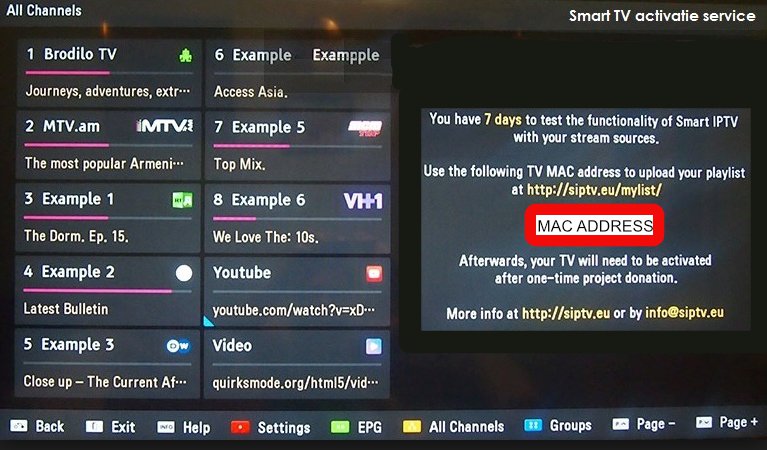
Find Your MAC Address
Open the Smart IPTV app. Your device's MAC address will be displayed on screen. Write this down as you'll need it.
Visit the Upload Page
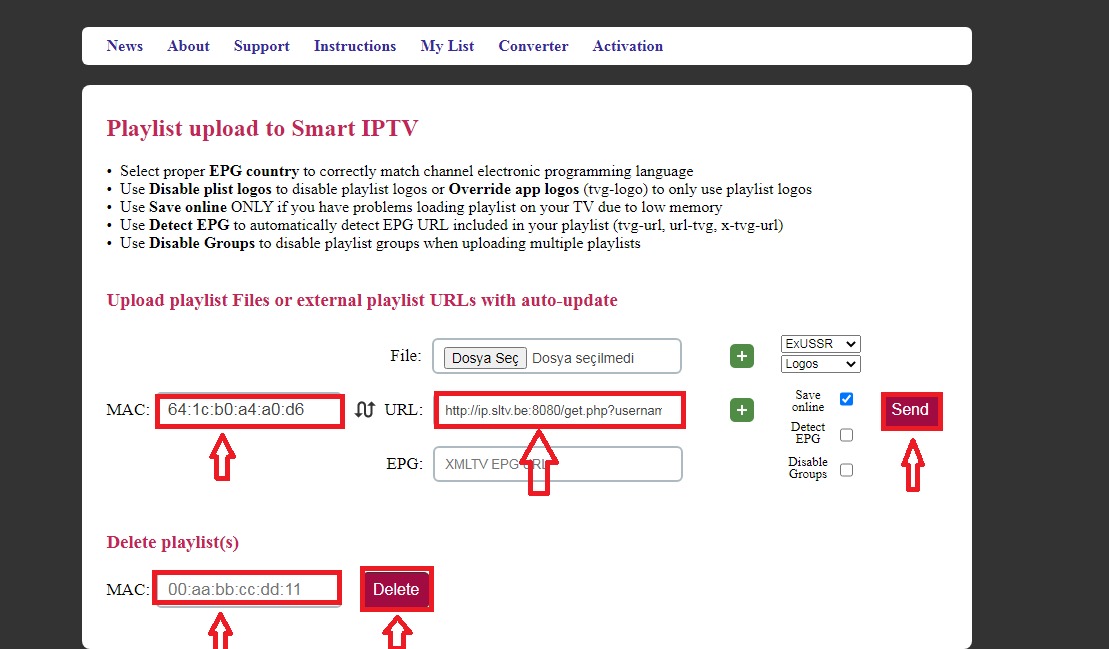
On your computer or phone, go to https://siptv.app/mylist/ to access the playlist upload page.
Upload Your Playlist
Enter your MAC address and paste the M3U URL from your welcome email. Click "Send" to upload.
Restart the App
Go back to your TV and restart the Smart IPTV app. Wait for the channels to load completely before pressing any buttons.
Do not press any buttons on your remote control until the loading screen is complete.
Setup Complete!
Your Smart IPTV is now configured with Fox IPTV. Enjoy watching your favorite channels and content!
Pro Tips
- If channels don't appear, try removing and re-adding the playlist
- Use the "Keep online" feature for faster loading times
- The app remembers your last watched channel
Need Help?
Our support team is available 24/7 to help you with the setup.



Don't Have a Subscription Yet?
Get started with a 24-hour free trial and experience premium IPTV on your Smart IPTV.